12 USB Peripherals That Earn Their Keep on Linux in 2026—and 6 That Need a Caution Sticker
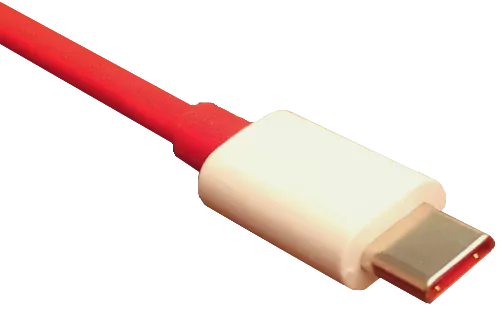
Photo: Xxmarijnw, CC0, via Wikimedia Commons
Generic claims like works with Linux are close to useless. A device can enumerate, show up in lsusb, and still fail at the thing you bought it for. A printer can appear as a USB device but refuse to print. A capture card can show a video node but drop frames. A storage enclosure can mount and then disconnect under load. The only compatibility claim worth trusting is one tied to a test you can repeat inside a return window.
This is not a lab report from a sealed room. It is a practical shortlist for US buyers in late 2026, built around devices that tend to behave with in-kernel drivers and straightforward standards: USB Audio Class, UVC, USB mass storage, FTDI serial, and driverless printing. The warning list is not a boycott. It is a list of popular products that need a specific workaround, a proprietary driver, or a feature you should not expect on Linux.
Test in the return window, not after
Before you buy, confirm the return policy at Best Buy, B&H, Micro Center, Amazon, or wherever you shop. Keep the box and accessories until you have tested. On Linux, run a quick baseline:
lsusb -t
sudo dmesg -w
journalctl -k -f
Then test the actual job. For audio, arecord -l and aplay -l. For video, v4l2-ctl --list-devices. For printers, lpstat -v and a real print. For storage, lsblk -o NAME,TRAN,MODEL and a sustained write. For serial, dmesg | grep tty and a loopback test if you have one. If the device fails, capture the exact kernel line before you return it.
12 that tend to just work
-
Focusrite Scarlett 2i2 4th Gen — class-compliant USB audio, no vendor control panel required for basic recording. Test with
arecord -land a real input source. The extras in Focusrite Control are a separate conversation. -
Behringer UMC202HD — another class-compliant audio interface that shows up in ALSA without drama. Check sample-rate behavior in your DAW before the return window closes.
-
Elgato Cam Link 4K — a UVC capture device that generally appears as a standard video node. Test with
v4l2-ctl --list-devicesand a real HDMI source, not just a black screen. -
Magewell USB Capture HDMI Gen 2 — a workhorse UVC capture box used by streamers and test benches. It is not cheap, but it tends to avoid proprietary Linux software requirements.
-
Brother HL-L2350DW — a common US mono laser printer that works through driverless printing or Brother's Linux packages depending on setup. Verify with
lpstat -vand an actual page, not just a discovered queue. -
StarTech ICUSB2321F FTDI serial adapter — FTDI chips are about as boring as USB serial gets, which is exactly what you want. The
ftdi_siodriver is in-kernel. -
Plugable USB 3.0 7-Port Powered Hub — the external power adapter matters more than the brand badge. It is a sane way to stop bus-powered devices from fighting over one port.
-
Realtek RTL9210B NVMe enclosure — a common bridge chip for USB NVMe enclosures. Test sustained writes and check
lsusb -tfor UAS behavior. Not every enclosure is equal, but this chipset is a reasonable starting point. -
Logitech C920 webcam — old faithful UVC hardware. It is not exciting in 2026, but it is predictable, widely available in the US, and easy to verify.
-
Blue Yeti microphone — a USB Audio Class device that usually appears as an input without a driver install. Test gain and monitoring in your actual app.
-
SanDisk Extreme Portable SSD — mass storage is the easy part. Verify sustained transfer and check
dmesgfor resets under load, especially on bus-powered hubs. -
Anker USB-C to USB-A adapter — a passive adapter is not glamorous, but a known-good one saves hours when you need to test a USB-A peripheral on a USB-C port. Confirm data support, not just charging.
6 that deserve a caution sticker
-
Elgato HD60 S+ — popular, but it is not a plain UVC device in the way Linux users hope. Expect proprietary software requirements and limited capture options. Buy only if you have a confirmed workflow.
-
TP-Link Archer T4U v3 — the Realtek RTL8812AU chipset often needs an out-of-tree driver. Kernel updates can break it. If you want plug-and-play Wi-Fi, look elsewhere.
-
Corsair K70 RGB MK.2 — typing usually works, but lighting control is not plug-and-play. You may need ckb-next or accept default behavior. Do not buy it for Linux-first RGB management.
-
Samsung T7 Touch — storage works, but the fingerprint reader is not a Linux feature. If biometric unlock is the reason you are buying it, skip it.
-
Razer Kiyo Pro — UVC video may work, but the Windows control software does not come along for the ride. Exposure, autofocus, and field-of-view controls can be limited.
-
DisplayLink docks such as the Plugable UD-3900 — these need the DisplayLink driver and do not behave like a normal GPU output. They can work, but treat them as a proprietary display technology, not a generic USB-C dock.
The rule that matters
Do not buy a peripheral because a forum post from three years ago said it worked. Buy it because you can test the exact function you need, on your kernel, inside a return window. Run the commands, save the dmesg output, and return the device if it fails. That is a more honest compatibility list than any badge on a box.