Pocket-Sized Impersonator: Turning a Pi Zero Into Any USB Device You Need
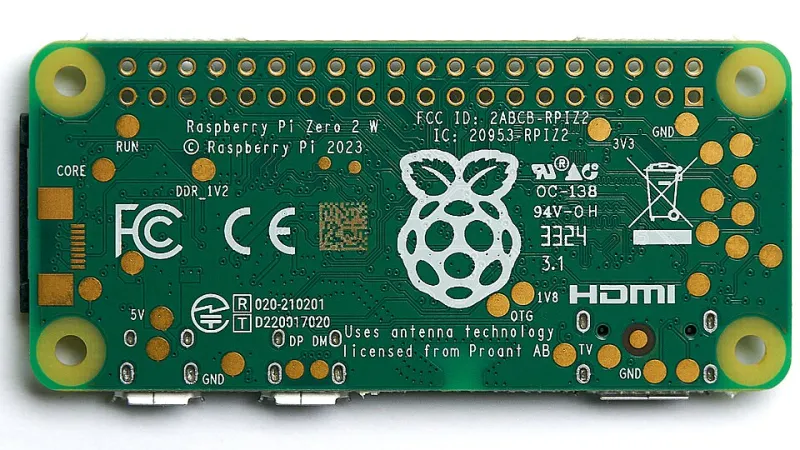
Photo: Anil Öztas, CC BY 4.0, via Wikimedia Commons
Most of the time a Linux board is the host. It owns the bus, it enumerates whatever you plug in, and it decides who talks first. Gadget mode flips that relationship completely. The board becomes the peripheral, and the machine on the other end of the cable has no idea it is talking to a full Linux system wearing a costume.
That is not a party trick. It is one of the most useful things you can put in a laptop bag.
What it can pretend to be
The kernel's USB gadget framework exposes a set of functions you can combine:
acm— a CDC-ACM serial port, appearing as/dev/ttyACM0on the host.ecmandrndis— Ethernet adapters. ECM for Linux and macOS, RNDIS for Windows.mass_storage— a disk, a removable drive, or a CD-ROM backed by an image file.hid— a keyboard, mouse, or arbitrary HID device.midi,uac1/uac2,printer— audio and printing devices, for the ambitious.
Functions are composable. One gadget can present a serial console, an Ethernet adapter, and a virtual CD at the same time, which is where the real usefulness lives.
Hardware, before anything else
A Pi Zero or Zero 2 W is the obvious choice: cheap, tiny, and it has a proper OTG-capable micro-USB port. On those boards the port labeled USB is the data port and PWR IN is power only. If you plug into the wrong one, nothing happens and you will spend an hour blaming software.
The single most common failure is the cable. A large share of micro-USB cables in circulation carry power and nothing else. If the host never shows a new device, swap the cable before you touch a config file.
Power is the second consideration. The host supplies roughly 500 mA over a standard port, which a Zero handles fine and a Zero 2 W handles while being asked to do very little. If you are running Wi-Fi, a getty, and a disk image simultaneously, you are close to the edge. Keep the workload modest or use a data cable with power injection rather than trying to feed the board from two sources at once.
Other boards work too. BeagleBones and several Rockchip boards have usable gadget controllers, and the Pi 4 and 5 can do it over USB-C with more configuration effort and less reliability.
The four lines that enable everything
In /boot/firmware/config.txt (or /boot/config.txt on older images), add:
dtoverlay=dwc2
In /boot/firmware/cmdline.txt, append to the existing single line — do not add a newline:
modules-load=dwc2
Reboot. Then confirm:
lsmod | grep dwc2
ls /sys/class/udc
The second command should print a controller name like fe980000.usb. That name is what you will bind the gadget to later. If the directory is empty, the overlay did not load and nothing below will work.
Building a gadget with configfs
Everything lives under /sys/kernel/config/usb_gadget. That filesystem is not persistent, which is the first thing to internalize: your gadget exists only until reboot, and you will eventually want a service to recreate it.
cd /sys/kernel/config/usb_gadget
mkdir rescue && cd rescue
echo 0x1d6b > idVendor
echo 0x0104 > idProduct
echo 0x0100 > bcdDevice
echo 0x0200 > bcdUSB
mkdir -p strings/0x409
echo 0123456789abcdef > strings/0x409/serialnumber
echo "USB With Linux" > strings/0x409/manufacturer
echo "Rescue Stick" > strings/0x409/product
mkdir -p configs/c.1/strings/0x409
echo "rescue config" > configs/c.1/strings/0x409/configuration
echo 250 > configs/c.1/MaxPower
Now add functions. A serial console:
mkdir functions/acm.GS0
ln -s functions/acm.GS0 configs/c.1/
On the Pi, enable a getty so the host actually gets a login prompt:
systemctl enable --now [email protected]
An Ethernet adapter, as a second function on the same gadget:
mkdir functions/ecm.usb0
ln -s functions/ecm.usb0 configs/c.1/
There is no DHCP server in this picture by default. Either assign static addresses on both ends or run dnsmasq on the Pi and let the host pull a lease. Windows will not use ECM; if that matters, add a rndis.usb0 function instead and accept that only one of the two network functions will be picked up per host.
A CD-ROM backed by an ISO — the function that saves you when a machine refuses to boot from USB:
mkdir functions/mass_storage.0
echo /srv/images/rescue.iso > functions/mass_storage.0/lun.0/file
echo 1 > functions/mass_storage.0/lun.0/cdrom
echo 1 > functions/mass_storage.0/lun.0/ro
echo 1 > functions/mass_storage.0/lun.0/removable
ln -s functions/mass_storage.0 configs/c.1/
For a plain disk instead, point lun.0/file at a filesystem image and leave cdrom at zero.
Finally, bind it to the controller:
echo fe980000.usb > UDC
The ID that is a keyboard
HID is the function people most want and most often bounce off of, because you have to supply a raw report descriptor. Set protocol to 1 and subclass to 1 for a boot keyboard, report_length to 8, and write the descriptor bytes into report_desc. Once bound, the Pi writes eight-byte reports to /dev/hidg0 and the host sees a keyboard that types whatever you tell it to.
The descriptor is the hard part — if you get the byte layout wrong, the host either ignores the device or accepts it as something useless. Copy a known-good boot keyboard descriptor from the kernel documentation and modify from there rather than composing one from scratch.
Pitfalls, in the order you will hit them
Your host caches device identities. If you reshape a gadget but keep the same VID, PID, and serial, Windows in particular may bind the old driver and behave strangely. Change the serial string when you change the gadget's shape.
Tearing down requires unbinding first. Write an empty string to UDC, remove the symlinks, remove the function directories, then rebuild. Skipping the unbind produces Device or resource busy.
Never export the running root filesystem. Pointing mass_storage at the image the Pi booted from, or at a partition it has mounted, invites corruption the moment the host writes to it. Unmount on the Pi first, every time.
USB 2.0 throughput is the ceiling. The Zero's controller is high speed at best, and real-world disk-image throughput lands well under what a native USB 3 port would give you. Fine for a serial console, tolerable for an ISO, slow for a large VM image.
ModemManager will probe your serial function. On desktop hosts it fires AT commands at any new ttyACM device. If that interferes, the udev ignore flag handles it.
What it is actually for
Plug it into a headless server in a colo rack and you have an out-of-band console for the cost of a sandwich. Plug it into a workstation with a dead network card and you have a link. Plug it into a machine that only boots from optical media and you have a virtual CD-ROM. Plug it into a lab box and you have an automated keyboard that types a 90-character recovery command flawlessly at 3 a.m.
Label the thing, put a good cable in the bag with it, and write the rebuild script now while you still remember how it works. The configfs commands are not hard, but they are not the kind of thing you want to reconstruct from memory in a data center aisle.